




Instant
pixelcode-instantfastAnswers right away. For short, clear tasks: fixing a bug, renaming, explaining a file or writing a test.
quick fixesquestions about your codetestssmall changes
context1M
reasonsNo
toolsYes
max output384K
You type what you need — “fix this bug”, “add this feature” — and Pixel Code reads your project, writes the code, tests it and shows you the change before saving it.
curl -fsSL https://code.pixel.ceo/install.sh | sh One-line install. Then type pxc inside your project folder.
The terminal is the text window where developers type commands. Pixel Code opens there, no new editor to install.
Before touching anything it reads the files that matter, so its changes fit your code instead of being generic.
It shows you every change line by line and tests it. If you don’t like it, it is discarded and your project stays as it was.
Ask in plain English, the way you would ask a teammate.
Paste this line in your terminal. The installer sets up the pxc command.
curl -fsSL https://code.pixel.ceo/install.sh | sh With your Pixel Code subscription or your own provider account (BYOA). If you use Pixel CEO, the app does it for you.
pxc loginInside your project folder, type what you need.
pxc "add search by name"Bring your own account. Use your own provider account or key with the CLI. And use it your way: on its own in your terminal, or with the Pixel CEO harness.
Pixel CEO is the app where you run an office of coding agents: every character is an agent working on your project. Pixel Code is designed to be their engine, the part that thinks and writes for them.
Branch: a working copy of the project so agents don’t step on each other’s changes.
A real Pixel CEO office with Lyra, an agent running on Pixel Code, solving a large task with CÓDICE. At the top, your battery. In the panel: the engine, the phases and the live terminal.
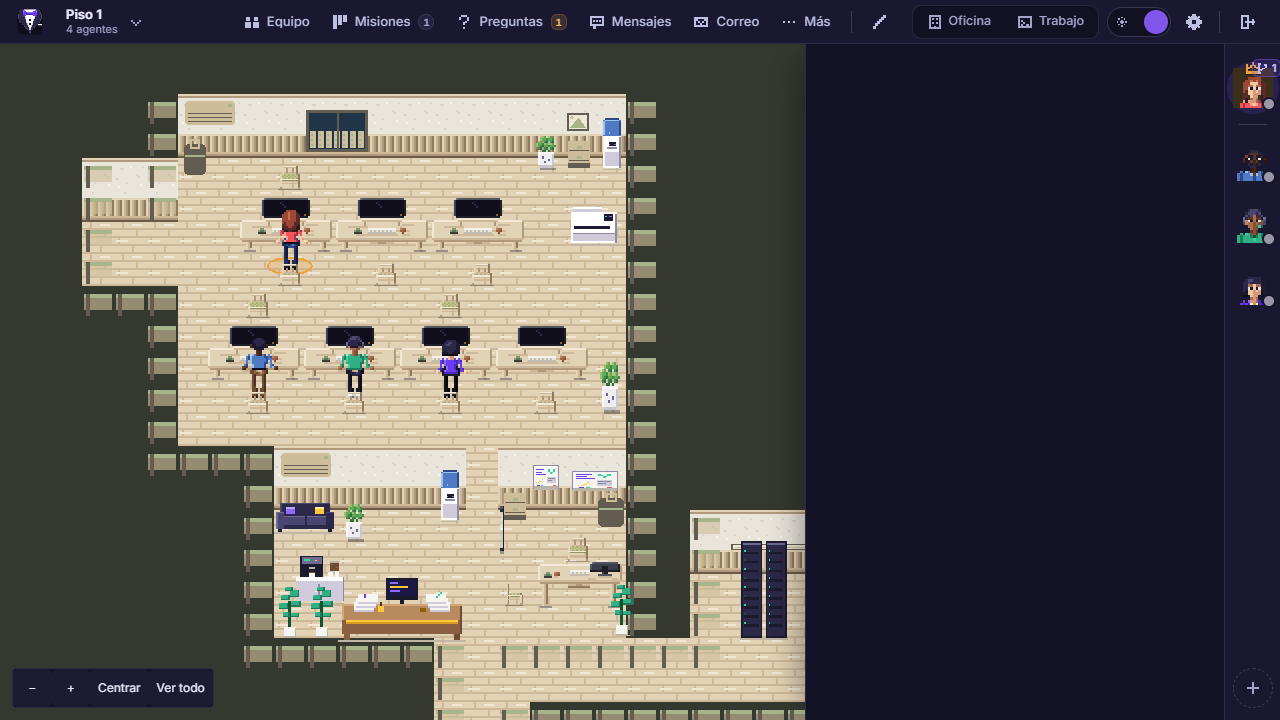

Composited on a real Pixel CEO 0.5.7 screenshot: the office and the top bar come from the app; the panel is an animated recreation with sample data.
CÓDICE is Pixel Code’s harness. A harness is what guides the agent: it splits the work into six phases and each one has to pass an automatic check before moving on. It works on a separate copy of your project and you sign off at the end.
Check: a command that answers yes or no, like “do the tests pass?”. Not another AI’s opinion.
Included in the “With Pixel CEO” plans proposal
First attempt: 45 of 47 tests. It repeated the phase with the 2 failures in view and passed.
You sign off. Nothing enters your project without your approval.
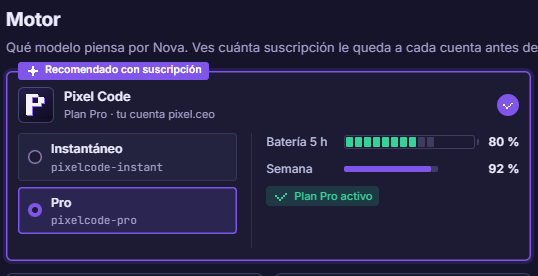
Pick the model when you start or when you hire an agent. Switch whenever you like.
pixelcode-instantfastAnswers right away. For short, clear tasks: fixing a bug, renaming, explaining a file or writing a test.
pixelcode-proreasonsThinks before answering: breaks the problem into steps, drops dead ends and reaches a solution. For hard bugs, design and long tasks with CÓDICE.
Based on DeepSeek, optimized for Pixel Code
What the agent does, not the model behind it. No made-up numbers: only each product’s public features.
| Feature | Pixel Code | Claude Code | Codex CLI | Gemini CLI | Cursor | Copilot |
|---|---|---|---|---|---|---|
| Runs in your terminal | ✓ | ✓ | ✓ | ✓ | ✓ | ✓ |
| Phases with checks and retryWon’t deliver until build, types, style and tests pass. | ✓ CÓDICE | with hooks | with hooks | with hooks | with hooks | with hooks |
| On its own or inside an agent officeThe same CLI, with or without the Pixel CEO harness. | ✓ | — | — | — | — | — |
| BYOA: your own account or keyUse your own provider account or key with the CLI. | ✓ | Claude only | ✓ | Google only | limited | ✓ |
| 5-hour and weekly batteryAn allowance that refills by itself, not monthly credits. | ✓ | ✓ | ✓ | — | — | — |
| Cloud agentKeeps working on a server while your laptop is closed. | — | ✓ | ✓ | — | ✓ | ✓ |
Instant against the fast models and Pro against the reasoning ones. Coding scores are the ones each company publishes, and they don’t always use the same test.
| model | context | reasons | tools | Terminal-Bench 4.0 | DeepSWE 1.1 |
|---|---|---|---|---|---|
| Pixel Code Instantbase DeepSeek V4.1-Flash, no reasoning | 1M | no, answers directly | ✓ | —a | —a |
| Claude Haiku 5.5 | 1M | yes, adaptive | ✓ | 39.2% | — |
| GPT-6 Luna | 1.05M | adjustable | ✓ | 16.4%b | 66.6%c |
| Gemini 3.8 Flash | 1M | adjustable | ✓ | 19.1% | 73.7% |
| model | context | reasons | tools | Terminal-Bench 4.0 | DeepSWE 1.1 |
|---|---|---|---|---|---|
| Pixel Code Probase DeepSeek V4.1-Flash, reasoning | 1M | yes, step by step | ✓ | 31.2%d | 74.2%d |
| Claude Sonnet 5.5 | 1M | yes, adaptive | ✓ | 70.6% | — |
| GPT-6.1 Sol | 1.05M | yes | ✓ | — | 75.2%c |
| Gemini 3.1 Propreview | 1M | yes | ✓ | —e | —e |
a DeepSeek publishes no scores for V4.1-Flash without reasoning. b Measured by Anthropic (Claude Haiku 5.5 page). c OpenAI’s figure. d Score of the base model DeepSeek V4.1-Flash at max effort, published by DeepSeek; Pixel Code Pro runs that model with reasoning. e Google publishes other tests: SWE-bench Verified 80.6%. Sources, checked on 8 Oct 2026: api-docs.deepseek.com and huggingface.co/deepseek-ai (DeepSeek-V4.1-Flash, 10 Sep 2026) · anthropic.com and platform.claude.com · developers.openai.com · ai.google.dev and deepmind.google (model cards). Scores use different effort levels and setups: compare with care.
Battery: every plan gives you an amount of usage per 5 hours and another per week, and it refills by itself. If it runs out early, buy an extra pack. prices are a proposal
pxc CLIExtra pack $9.90
Choose StarterExtra pack $18.90
Choose ProExtra pack $45.90
Choose StudioBattery ran out before the cycle ends? Buy another full pack at your plan’s price without the harness, 10% off. It lasts until the end of the cycle and you can buy up to 3 per cycle.
| plan | CLI only | extra pack (−10%) |
|---|---|---|
| Starter | $11 | $9.90 |
| Pro | $21 | $18.90 |
| Studio | $51 | $45.90 |
In the Pixel CEO top bar, the pill shows your battery. When it runs out, it offers the extra pack with your plan’s price already worked out.
It is built for people who code: you’ll follow the changes better if you can read code. But every change comes explained in plain language.
It saves nothing without your permission. With CÓDICE it works on a separate copy and only hands you the change when every check passes.
Pixel Code’s autonomous mode for big tasks: six phases, each with its own automatic check. If one fails it repeats it; at the end, you sign off.
Yes. The CLI works with or without the Pixel CEO harness. With the “CLI only + pack” plan you get pxc and your battery in any terminal; Pixel CEO adds CÓDICE and your agents.
The 5-hour one refills by itself. If you don’t want to wait, buy an extra pack: up to 3 per cycle.
“Bring your own account”: you can use your own provider account or key with the Pixel Code CLI instead of your plan’s battery.
Your project stays on your disk. For each request only the text needed is sent to Pixel Code’s servers (pixel.ceo/v1), which run it through the model and send back the answer.
A chat gives you text to copy. Pixel Code opens your files, makes the change, tests it and asks permission to save it.
curl -fsSL https://code.pixel.ceo/install.sh | sh Then pxc login and give it its first task. Using Pixel CEO? Hire it as an engine.